


Ever had two customers arrive at the same time, both expecting the same keys? Or maybe a late-night schedule sync revealed a sudden conflict. If you’re looking for how to handle double booking without refunds or awkward calls, you’ve come to the right place!
When demand surges and cancellations strike, booking pressure hits hard. A tiny blind spot can quickly spiral into frustrated customers and lost trust. But here’s the secret: these moments aren’t failures, they’re proof that your business is outgrowing its current systems.
It’s time to trade the chaos for clarity. This guide breaks down overbooking, double booking, legal essentials, and the smartest ways to scale your demand with confidence. Ready to turn scheduling errors into growth? Let’s dive into the solutions!
What Is Overbooking in a Rental Business?

Overbooking in the rental industry is the intentional practice of accepting more reservations than available inventory to maximize revenue. This strategy ensures your equipment stays busy and profitable during peak seasons, rather than sitting idle due to last-minute cancellations and no-shows.
Overbooking works only when backed by clear rules, accurate data, and customer transparency. When handled properly, it helps rental owners stay profitable without creating last-minute conflicts or broken promises.
What Is Double Booking in a Rental Business?

Double booking in a rental business occurs when two customers receive confirmed reservations for the same item or time slot. It usually happens due to manual errors, unsynced calendars, or system delays across multiple booking channels.
Unlike overbooking, double booking is unplanned and reactive. It often leads to refunds, cancellations, and damaged trust, especially when customers expect guaranteed availability. Implementing real-time inventory management and synced booking systems can help you avoid double booking.
Overbooking vs. Double Booking: What’s the Real Difference?
Overbooking and double booking might sound similar, but the real difference lies in control and intention.
Overbooking is a proactive strategy. It’s like selling extra tickets to a concert knowing you can add more chairs. You see high demand, understand your capacity, and make a calculated decision to oversell because you have a backup plan, like substitute items or other suppliers.
Overbooking is data-driven and strategic. It aims to maximize sales while ensuring customers are still accommodated. According to a study, Overbooking can increase profits by 2% to 5% by leveraging no-show rates.
Double booking, however, is a reactive mistake. It happens when your system fails, and you accidentally sell the same item to two different people. Instead of managing a sale, you’re left scrambling to fix an error.
So, one is smart planning; the other is a preventable accident that can disappoint customers. The real risk appears when businesses confuse the two.
Having the right tools and visibility is the only way to turn a potential mistake into a strategic win.
Overbooking vs. Double Booking at a Glance
Here are the key differences between overbooking and double booking:
Aspect | Overbooking | Double Booking |
Core meaning | Planned extra bookings based on data | Accidental overlap for the same item |
Intent | Intentional and controlled | Unintentional and error-driven |
Planning involved | Uses limits, buffers, and backups | No planning or safety checks |
Inventory visibility | Fully tracked and monitored | Often unclear or outdated |
Customer impact | Managed with substitutes or options | Creates conflict and disappointment |
Risk level | Low when rules are in place | High and damaging |
Business outcome | Higher revenue with control | Refunds, complaints, trust loss |
Why Rental Businesses Overbook (And When It Makes Sense)
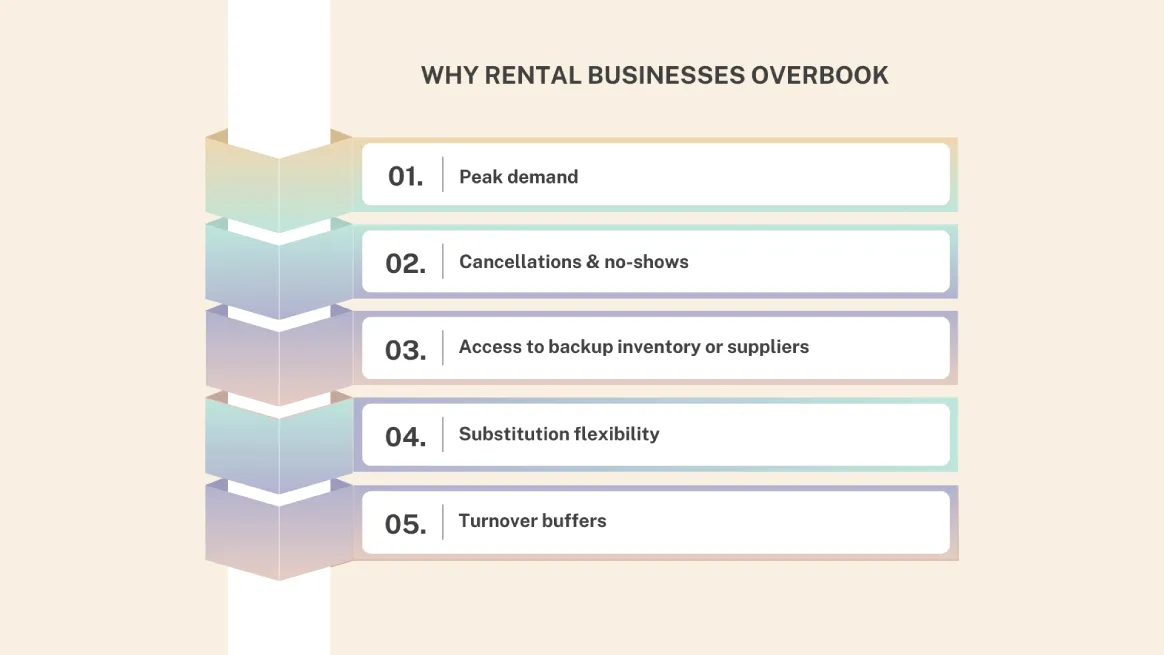
Rental businesses often overbook to handle busy times like holidays or events. Sudden booking spikes can happen, and if every slot is tightly booked, last-minute changes can leave items unused when they’re most needed.
Late cancellations and no-shows are another major factor. Since some customers inevitably back out or simply don’t show up, overbooking fills those gaps. This ensures equipment stays in use rather than sitting empty during your busiest times.
You can prepare for higher-than-expected demand by having backup inventory or reliable suppliers. Extra stock or dependable partners help you meet customer needs without disruptions.
Another important strategy is substitution flexibility. Offering similar models or alternatives lets you keep bookings intact even when exact items aren’t available.
Lastly, turnover buffers. Adding extra time between rentals for cleaning and safety checks helps transitions run smoothly. This makes managed overbooking both practical and reliable.
Is Overbooking Legal in a Rental Business?

Overbooking is generally legal if done transparently and without fraud. While laws vary, clear policies and fair alternatives help reduce risks.
For instance, stating that items are subject to availability or substitution in your terms and conditions keeps you protected. Businesses like airlines and hotels often use such clauses, ensuring customers receive the item, a substitution, or a refund.
Issues arise when customers are misled.
For example, knowingly double-booking a unique item, like a vintage wedding archway, without informing the renter, can breach contract laws and consumer trust. This is why overbooking is sometimes seen as risky rather than strategic.
A strong rental agreement is your best protection. It should explain what happens if an item becomes unavailable, such as damage from a previous renter.
Tools like RentMy set limits, trigger alerts, and prevent blind conflicts. This makes intentional overbooking far safer than accidental overlaps caused by poor inventory management.
How to Handle Overbooking with RentMy
RentMy prevents scheduling conflicts while maintaining rental flexibility. The rule-based Intelligent Overbooking System allows owners to manually override inventory limits without creating hidden overlaps or tracking errors. Every overbooked order remains within defined system parameters to ensure inventory accuracy.
How RentMy’s Overbooking Feature Works
RentMy allows rental businesses to accept orders beyond their actual inventory, only when they choose to.
How it works:
- Every rental item has a base stock quantity.
- Owners can choose to apply “Overbooking applies only to rental items.”
- They may set:
- A fixed overbooking quantity, or
- A percentage-based overbooking limit.
Example:
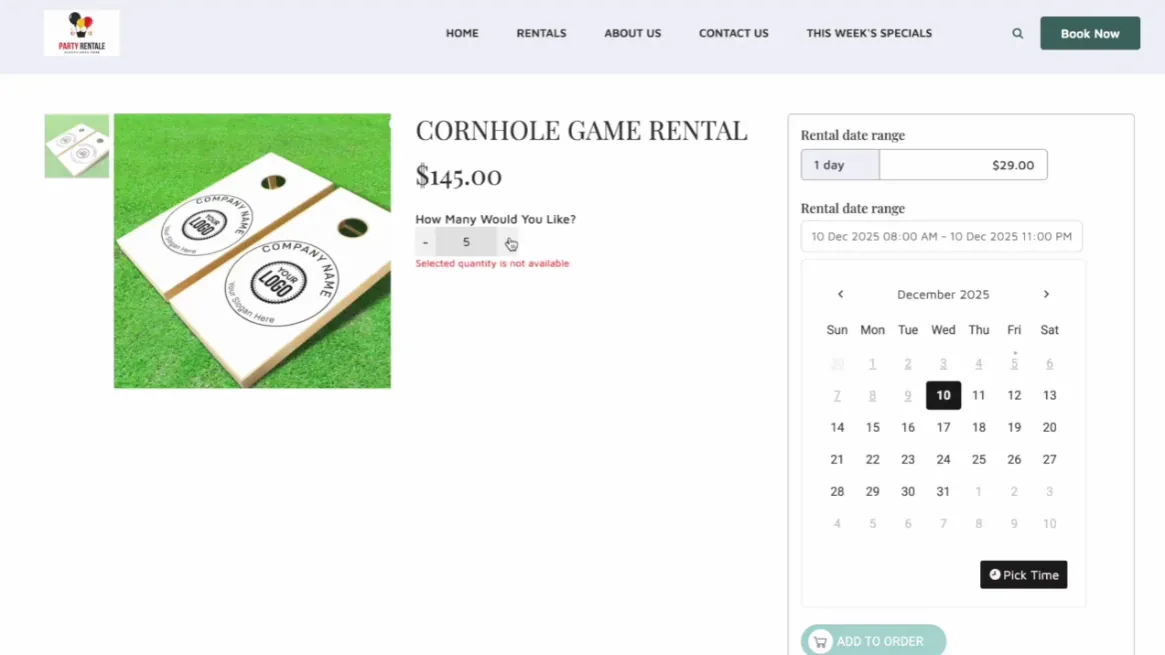
If inventory has 1 item but overbooking is set to +3, customers can order:
1 (actual stock) + 3 (overbooking allowance) = 4 units
If someone tries to order more than 4, RentMy displays:
“Selected quantity is not available.”
This ensures overbooking happens only within safe limits.
How RentMy Displays & Manages Overbooked Items
You can monitor overbooked items at both the order and inventory levels.
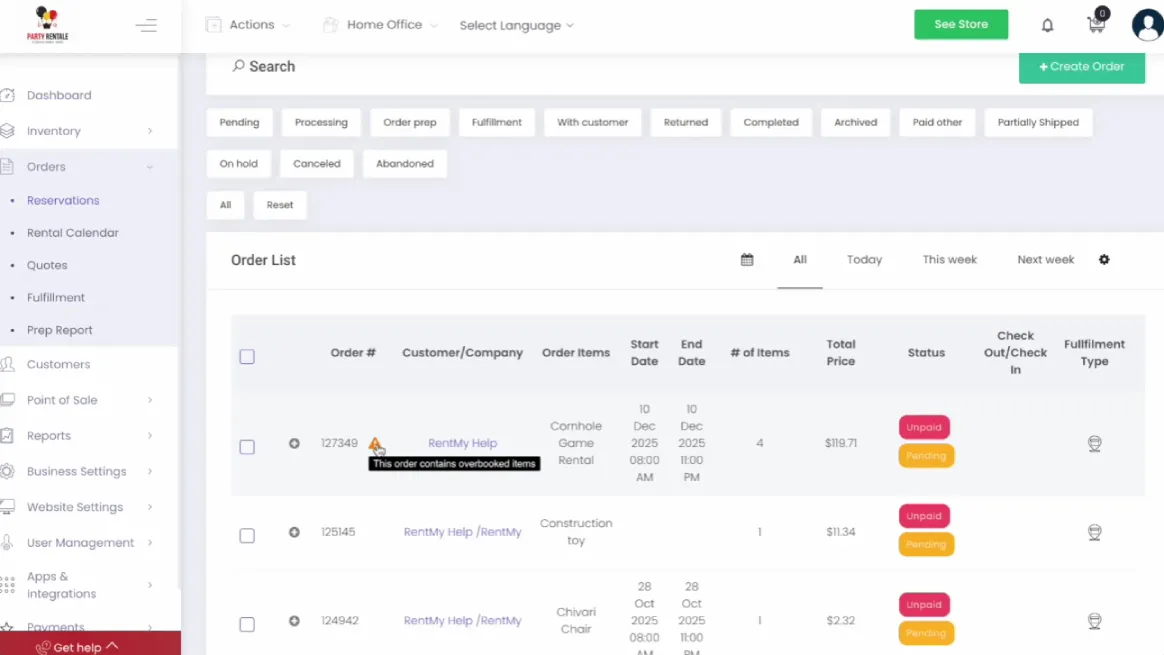
Order-Level Alerts
- Go to your Dashboard and click on Orders.
- Select the Order List.
- Any order containing overbooked items will be flagged with the alert: “The order contains overbooked items.”
Path:
Dashboard → Orders → Order List
Inventory-Level Visibility
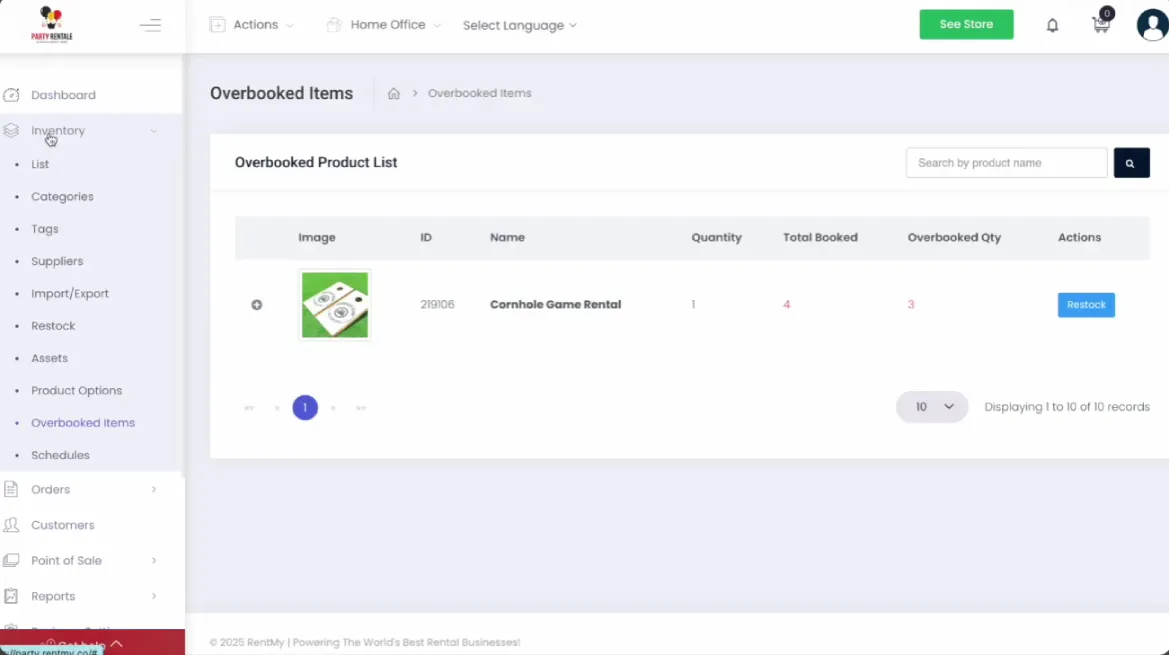
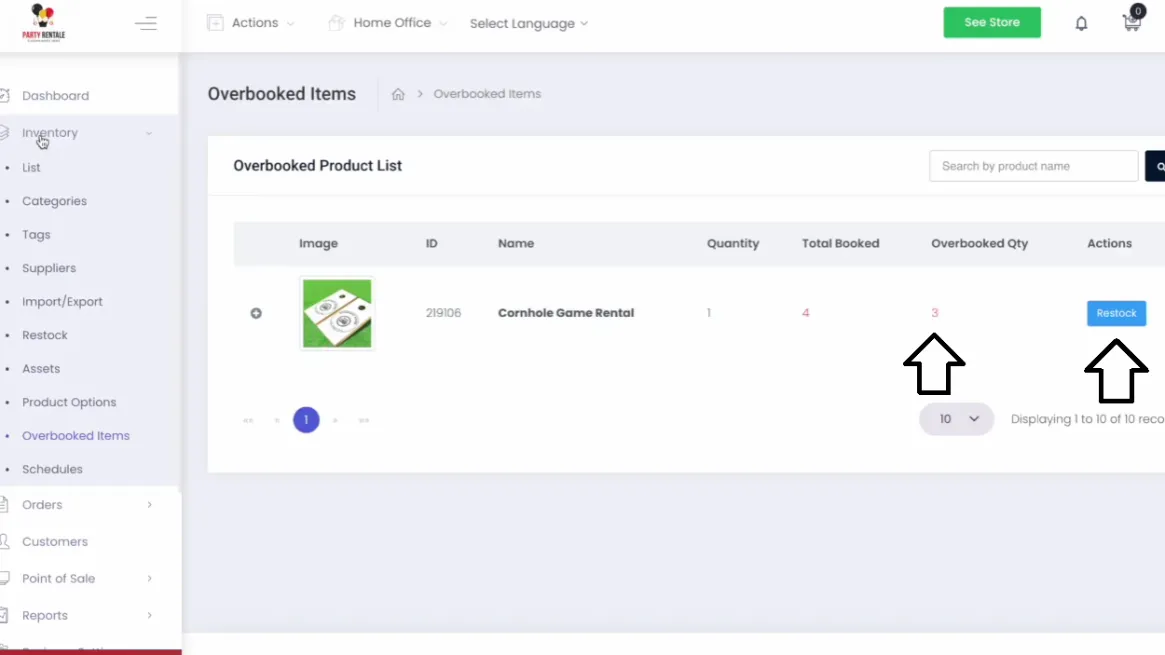
- Go to your Dashboard and click on Inventory.
- Select the Overbooked Items tab.
- Here you will see a list of all overbooked items, including the Order ID, Product name, Stock quantity, Total booked, and Overbooked quantity.
Path:
Dashboard → Inventory → Overbooked Items Tab
Restocking Overbooked Items
- From the Overbooked Items tab in your inventory, find the item you need to update.
- Click the “Restock” button to adjust your inventory levels accordingly.
Why RentMy Overbooking Is Safe & Profitable
Overbooking only works when customers trust you. That trust is built on clear communication and having control over your inventory. This is where most rental businesses struggle, and it’s where RentMy can help.
RentMy shows overbooking limits clearly when customers book, so they know your policies from the start. This builds trust and avoids confusion, especially during busy times when availability changes quickly.
No surprise conflicts matter most during peak demand.
RentMy uses real-time inventory tracking and live calendars to stop overlapping reservations before they happen. This means your customers and staff won’t have to deal with last-minute scrambles caused by outdated booking systems.
Revenue increases when inventory stays active without hassle. RentMy uses data to set limits based on cancellations, which helps businesses earn more during busy times. Owners can plan better for seasons without risking availability.
When you solve problems early, customer complaints go down. RentMy helps you do this with alerts, options for substitutions, and a clear view of your suppliers. Fewer surprises lead to better reviews, more bookings, and lasting trust.
Into An Advantage
Accept more orders safely without risking overlaps, refunds, or angry calls.
- Free trial
- No credit card required
Preventing Overbooking From Turning Into Double Booking
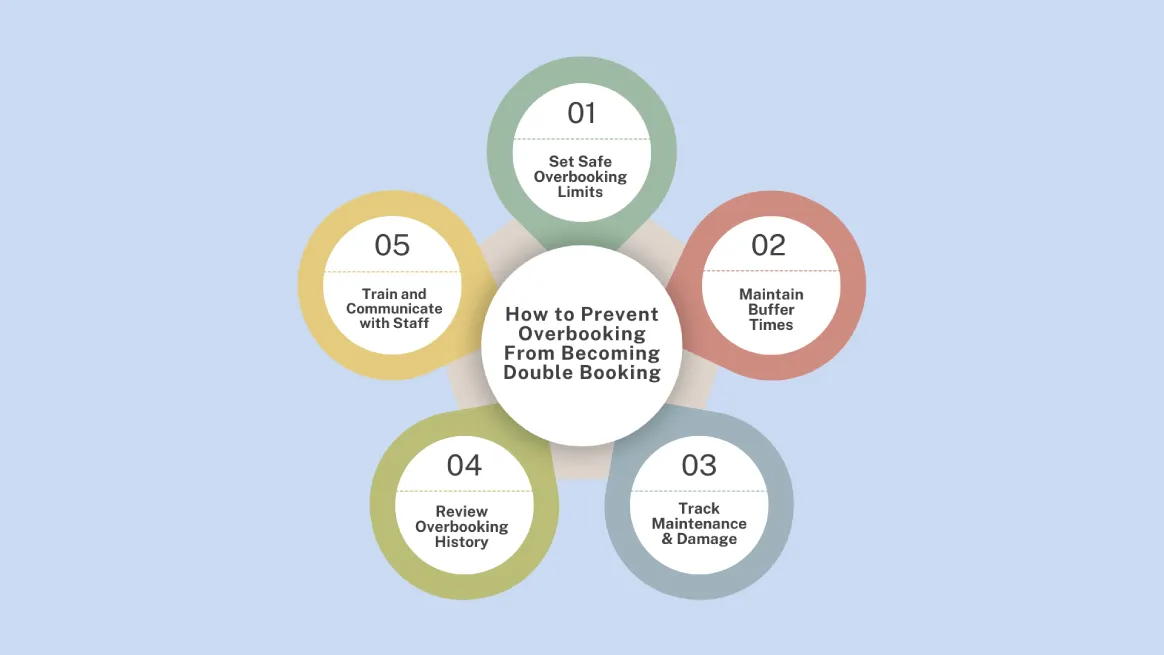
Even with the best software, you need a strong operational strategy. Approach overbooking with caution; start conservatively and test your suppliers’ reliability before promising their inventory.
Always build a “turnaround buffer” in your schedule for cleaning and inspections. This reduces stress on your team and prevents errors.
If an item is returned broken, your system should immediately remove it from availability. RentMy lets you mark each item with a unique id for maintenance. This prevents them from being booked.
Use historical data to make smart purchasing decisions. If you’re constantly overbooking an item, it’s time to buy more.
Clear communication and team training are also vital to prevent accidental double bookings.
By putting these safeguards in place, you can make your inventory management more accurate and efficient. This will help you turn booking conflicts into profit.
Manual Overbooking vs RentMy Overbooking
Booking conflicts happen when you plan manually instead of using a rule-based system.
Manual methods like spreadsheets are often outdated and don’t have real-time updates or alerts. This is how accidental double bookings happen.
Instead of preventing problems, teams end up scrambling to fix them, especially as the business grows.
RentMy is smarter. It uses real-time inventory updates, clear customer limits, and instant alerts to stop conflicts before they start.
Built-in restock and backup options keep everything in sync. This proactive approach makes overbooking manageable and less stressful, so you can focus on growing your business.
Manual Overbooking vs. RentMy Overbooking: At a Glance
Here’s a comparison of manual overbooking methods versus RentMy’s rule-based approach:
Feature | Manual Overbooking | RentMy Overbooking |
Booking approach | Guesswork and memory-based | Rule-driven and intentional |
Inventory visibility | Limited and often outdated | Full, real-time visibility |
Multi-channel sync | No | Yes |
Customer limits | Undefined | Clearly set |
Alerts for conflicts | Late or none | Instant, real-time |
Restock or backup option | Not supported | Built-in |
Risk of double booking | High | Very low |
Overall control | Reactive | Proactive |
Best Practices for Overbooking in Rental Businesses
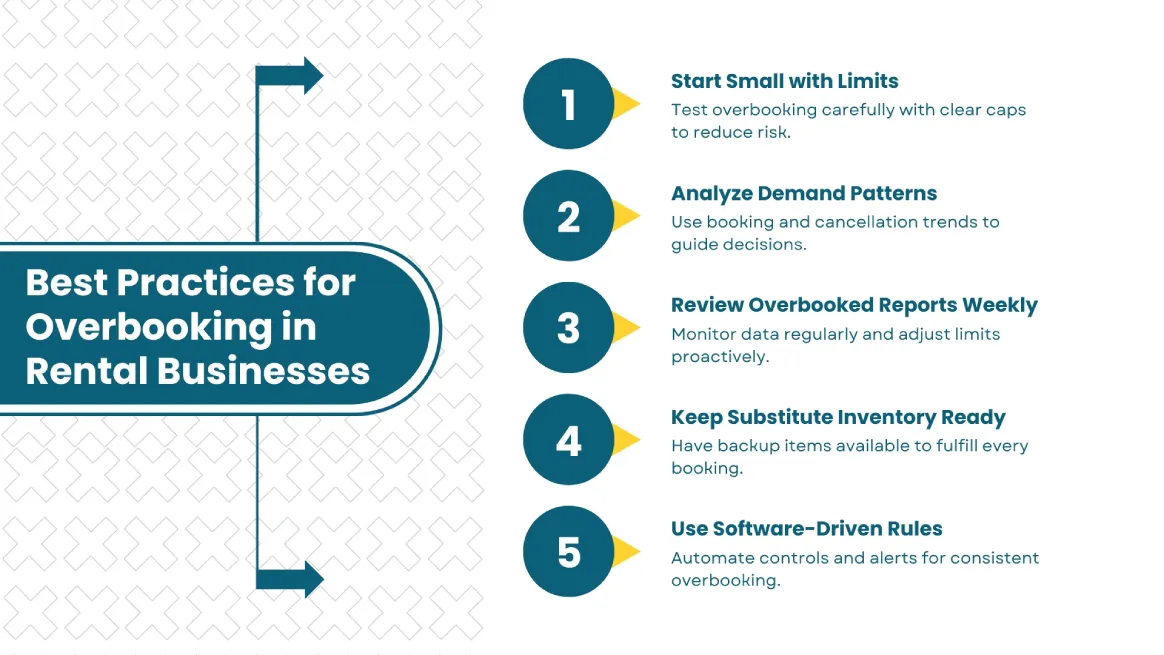
Overbooking works best when you ease into it. Starting small with clear limits lets you learn without risking customer trust.
Let demand patterns guide your strategy. Analyze when bookings spike or cancel to see where overbooking makes the most sense.
Reviewing overbooked reports daily helps you turn data into actionable insights. It allows you to adjust your limits proactively.
Always keep substitute inventory ready. Having similar items on hand provides a safety net. It ensures you can honor bookings and keep customers happy even when specific units are unavailable.
Finally, use software-driven rules to tie everything together. Automated limits and alerts replace estimation with consistency. So this way, overbooking becomes a controlled and stress-free part of your operations.
When Should You Upgrade Your Booking System?
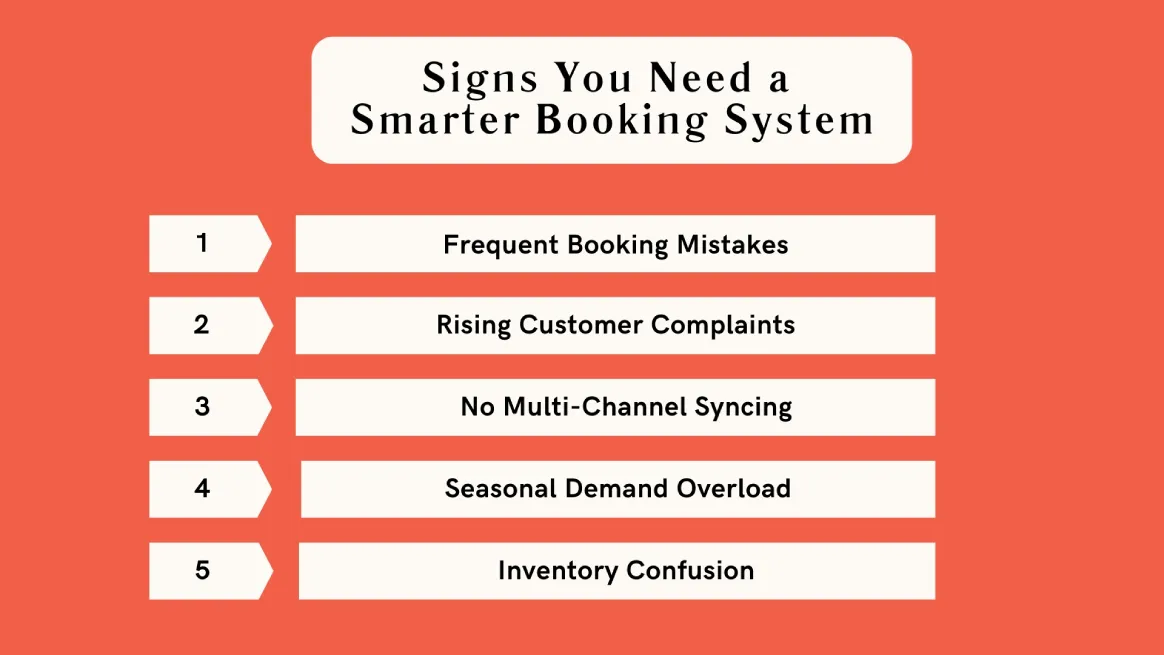
Frequent mistaken bookings are a clear sign that your current system isn’t working. When staff spend more time double-checking calendars than helping customers, it’s obvious the process is slowing your business down.
This often leads to customer complaints. Missed reservations, last-minute changes, or double bookings can quickly erode trust, especially during busy periods when expectations are higher.
If you sell across multiple channels, this problem gets even worse. Without real-time syncing across websites, marketplaces, and social platforms, blind spots and conflicts occur.
Seasonal surges expose these weaknesses even more. Peak demand makes manual scheduling slow and risky. Spreadsheets, notes, and memory can’t keep up with fast-moving inventory.
Finally, inventory confusion becomes the breaking point. If teams don’t know what’s available, what’s out for maintenance, or what’s already reserved, it’s time to upgrade.
A smarter booking system can eliminate these problems by improving clarity, syncing channels, and keeping your business running smoothly, even as it grows.
Conclusion
We’ve come full circle, explaining overbooking and showing you how to handle double booking calmly. The goal is simple: protect customer trust and keep rentals running smoothly.
Overbooking itself isn’t the problem. With clear limits and data-driven decisions, it becomes a helpful tool. The result is calmer teams, happier customers, and no last-minute emergencies.
If bookings feel chaotic, it’s time for a change. Growth should feel controlled. Tools like RentMy remove guesswork and protect your reputation, helping you scale with confidence.
FAQs
Confirm conflicts immediately and pause new bookings. Apologize to affected customers and contact them quickly. Prioritize earliest reservations, offer solutions like substitutes or refunds, and provide fair compensation if needed. Update calendars, document the issue, and use booking tools to prevent future conflicts.
Act quickly. Apologize and explain the overlap to both customers. Honor the first booking, then offer the second client alternatives like different dates, similar items, or a full refund. Update your calendar immediately and review your system to prevent it from happening again.
Avoid double bookings by centralizing inventory in one system. Sync in real-time, set buffers, and lock items during maintenance. Use weekly reports to spot issues and replace manual edits with alerts and approval rules to prevent overlaps before confirmations.
Double booking can lead to refunds, negative reviews, and lost customer trust. It shifts staff focus to damage control and can cause legal issues if contracts are breached. Repeated conflicts harm revenue, rankings, and partner relationships, especially during busy seasons.