


Ever wondered how to start an online store without inventory while keeping costs low and freedom high? If you’re looking for a business that runs from your laptop or to test a new idea without buying a bunch of stock, well, you’ve come to the right place!
The timing is perfect! Online shopping is booming, with experts predicting it will grow into a massive $1.54 trillion market by 2030. That means there’s plenty of room for new entrepreneurs like you to jump in and succeed.
Feeling a bit lost? No worries! We’ll cover simple, beginner-friendly steps for platforms, rental models, marketing, and automation. Ready to dive in? Let’s get to it.
Why You Don’t Need Inventory to Run an Online Store?

Online commerce is booming, with the e-commerce market set to hit USD 1.17 trillion in 2025 and grow at a 5.59% CAGR (2025-2030), reaching USD 1.54 trillion by 2030.
This rising demand means even inventory-free businesses can access a massive customer base.
Skipping inventory keeps costs low. Without storage or bulk purchases, you reduce financial risk and avoid overhead that can eat into profits. For first-time entrepreneurs, this simplicity is a lifesaver.
An inventory-free model also makes logistics easy. No packing, shipping, or returns to manage means you can launch quickly, adapt to new products, and scale with minimal hassle.
And when demand shifts, you can pivot effortlessly.
Plus, the flexibility to experiment is invaluable. Test ideas, tweak offers, and follow trends without worrying about unsold stock. This agility helps you learn what works and build a lean, responsive business.
Starting an online store without inventory isn’t just easy; it’s the smart move.
Business Models for Starting an Online Store Without Inventory

You can build an online store without inventory in several ways. The right one for you depends on your involvement level, launch speed, and desired customer relationship. Let’s explore the main options to help you choose the best model for your goals, skills, and plans.
A. Rental Model
The rental model lets you start an online store without inventory by giving people access to tools, gear, or equipment without buying anything up front.
You can partner with local suppliers or use items already sitting idle at home. This keeps costs low while allowing you to serve customers who need items for short-term use.
Rentals work well for entrepreneurs who want steady demand and local repeat business. With the right rental software, you can handle bookings, payments, schedules, and reminders without manual issues. This builds a smoother experience for customers and keeps your operations organized from day one.
The challenge comes from managing availability, partners, and item maintenance. You need accurate calendars, reliable assets, and strong communication to avoid conflicts.
Rental management tools like RentMy remove most of the pressure by automating bookings, digital contracts, payments, and updates so customers always know what to expect.
Advantages of the Rental Model
- Lower startup costs with no need to buy inventory
- No storage space required
- High repeat business potential
- Automated bookings and communication through rental management tools
- Flexible pricing based on hours, days, or weeks
Challenges of the Rental Model
- Requires reliable partners or assets
- Needs clear scheduling to prevent double bookings
- Physical items require upkeep and handling
B. Dropshipping
Dropshipping is a business model where you sell products online without ever handling them yourself. You set up an online store and focus on marketing, while a third-party supplier takes care of storing, packing, and shipping the products directly to your customers.
This approach is great for starting a business quickly with low financial risk. Since you don’t buy inventory upfront, you can easily test different products and niches to see what sells best.
It’s an ideal choice for running a business entirely online with minimal involvement in logistics.
However, dropshipping has its downsides too. Since you’re not in charge of product quality or shipping, delays and low-quality items can end up hurting your brand’s image.
Profit margins can also be thin, and competition is often high since many sellers use the same suppliers.
Despite these challenges, with careful supplier selection, strong branding, and smart dropshipping strategies, this model can be an effective way to enter the e-commerce world.
Advantages of the Dropshipping Model
- No product purchases required upfront
- Easy to test many product ideas
- Fast launch with low financial risk
- No packing, shipping, or storage
Challenges of the Dropshipping Model
- Lower margins
- Less control over quality and delivery
- Customer service complications when issues arise
- High competition in popular niches
C. Print on Demand
Print on demand (POD) allows you to sell custom-designed products online without holding any inventory. When a customer orders something like a T-shirt, mug, or poster, a printing partner produces and ships it for you.
This model is comfortable for artists and creators because you can sell your designs without paying for a large batch of products upfront. It’s a flexible, low-risk way to test new ideas and build a brand.
The main downside is the cost. Since items are made one by one, they are more expensive to produce. This means lower profit margins for you.
Quality can also differ between printing companies, and shipping might be slow during busy times. Still, POD is an easy way to start a creative business without managing inventory.
Advantages of the Print-on-Demand Model
- No upfront cost for products
- Easy to launch new designs
- Great for creative niches
- No storage or shipping work
Challenges of the Print-on-Demand Model
- Higher production cost per item
- Quality may vary by printer
- Slow fulfillment during busy seasons
- Margins depend heavily on pricing strategy
D. Affiliate Sales
Affiliate sales let you earn money by promoting products without stocking them. You share links on your website, videos, or guides, and when people buy, you get a commission.
There’s no need to handle shipping or customer support. Your only job is to bring in buyers.
The affiliate model works well for bloggers, reviewers, or creators who like recommending things. It’s an easy way to start an online business without inventory, and your income grows with your audience.
All you need is good content and regular traffic.
The downside? You don’t control product quality or prices, and changes to commissions or products can impact your earnings. But if you love creating content, affiliate sales can offer steady, long-term income.
Advantages of the Affiliate Sales Model
- No product handling
- Zero inventory or shipping
- Great for content-driven businesses
- Easy to scale with traffic
Challenges of the Affiliate Sales Model
- Income depends on commission rates
- No control over quality or pricing
- Requires strong marketing or content skills
- Changes to programs can affect earnings
E. Digital Products
Selling digital products like ebooks, templates, or courses is a clean way to start an online store without managing inventory. Since customers get their purchases instantly, you don’t have to worry about shipping or storage costs.
Once you create a digital product, you can sell it over and over with little extra effort, making it a very scalable business idea.
This works well for experts like teachers, writers, or designers who want to sell their knowledge.
The main challenge is creating a high-quality product that people find useful. There’s often a lot of competition, and you’ll need to protect your work from being copied.
However, if your product becomes popular, you can earn money consistently with very little day-to-day effort.
Advantages of the Digital Product Model
- No physical goods or shipping
- Instant, automated delivery
- High margins
- Scalable worldwide
Challenges of the Digital Product Model
- Requires upfront creation
- Competition in many niches
- File security can be an issue
- Marketing is necessary to stand out
Comparison Table: Zero-Inventory Business Models
The table below compares the rental model to other zero-inventory business models.
Model | Upfront Cost | Control Over Product | Profit Margin | Skill Needed | Best For |
Rental Model | Low | High | High | Local coordination + scheduling | Entrepreneurs wanting steady, local demand |
Dropshipping | Very Low | Low | Low–Medium | Marketing + supplier research | Beginners wanting a fast online launch |
Print on Demand | Very Low | Medium | Medium | Creative design + branding | Artists and niche creators |
Affiliate Sales | Zero | Very Low | Low–Medium | Content creation | Bloggers, reviewers, influencers |
Digital Products | Low (time investment) | High | High | Writing, design, teaching, or coding | Experts and creators want passive income |
Disclaimer: The comparisons above are general guidelines. Actual costs, profit margins, and skill requirements can vary based on your industry, location, and business strategy. Always research and adjust these models to fit your unique situation.
Why the Rental Model Is the Best Option for Zero-Inventory Entrepreneurs

The rental model is perfect for entrepreneurs looking to avoid inventory troubles.
Tools like RentMy simplify the process with real-time rental booking and instant inventory management, ensuring items are always available and avoiding scheduling conflicts.
Seamless integration with platforms like WordPress lets you create a professional storefront without technical headaches, syncing bookings, calendars, and updates effortlessly.
RentMy also automates payments, scheduling, and customer communication. It handles confirmations, reminders, and rescheduling, which saves time and effort.
Flexible options let you customize rental periods and pricing, adjusting dynamically for peak demand. Paperless agreements with secure payment vaulting protect customer data and enable easy repeat transactions.
AI-powered tools enhance SEO, improve product images, and suggest keywords, boosting visibility without extra marketing costs.
These features cut admin time by up to 80%, prevent double bookings with live syncing, and deliver seamless customer experiences through instant confirmations. This helps you get customer loyalty and positive reviews.
Working Rental Store
RentMy handles the tough tasks while you grow.
- Free trial
- No credit card required
6 Steps to Start an Online Rental Store Without Inventory
Before you start an online rental business, you need to choose the right rental niche. This should be a niche that is profitable, in-demand, and fits your long-term goals.
Step 1: Conduct Research to Find a Profitable Rental Market

Your strategy should be a practical guide you follow before your first booking goes live or you build your website. These early decisions shape everything that follows, from your offers to your pricing. Once you know who you serve and what they want, the rest flows more easily.
A. Partner with Local Suppliers or Individuals
Working with local suppliers lets you run a rental store without buying items up front.
Suppliers provide the items, and you manage bookings and customer support. This keeps costs low and helps grow your catalog quickly.
Clear communication keeps everyone on the same page. Set clear expectations about item care, revenue sharing, and availability to avoid issues and keep things running smoothly.
Local suppliers also make logistics easier with shorter travel times and more personal coordination.
You’ll notice that these partnerships often deepen over time. As trust builds, suppliers might offer more items or exclusive deals that help you expand without needing storage, repairs, or big investments.
B. Use Underutilized Personal Assets (camera gear, tools, event items, etc.)
Renting out items you already own is an easy way to start earning extra income. Whether it’s camera gear, tools, or event decor, unused equipment can generate money while staying under your control. This makes scheduling and maintenance simple.
Begin with a quick audit of what you have. Identify items that rarely get used but could be valuable to renters. Keep everything clean and well-maintained, and set clear terms to avoid damage or loss.
Using basic asset tracking can help you stay organized as demand grows.
This works especially well in niche or close-knit markets, where people value quality and trust where their rentals come from.
Over time, you can build a focused rental business, adding more items only when the revenue justifies it. With the right approach, your unused belongings can become the foundation of a growing side hustle.
Step 2: Validate Local Demand

Before listing or marketing, make sure your idea works for your area. These tools show what people want, how often they search for it, and if the timing is right.
A. Use Google Trends & Keyword Tools
Tools like Google Trends and Keyword Planner can show you when interest in your products goes up or down. They also help you guess how many people are searching for items you rent and the exact words they use.
This data lets you predict busy and slow times. If you see searches increase during holidays, you’ll know when to promote your items. You can also use the most popular search terms in your listings.
Checking these tools regularly helps you stay ahead of changes. You can adjust your pricing or offers based on real demand, not assumptions. This keeps your business and your rental items relevant.
B. Check Local Groups, Forums & Social Communities
Local online groups show what people really talk about and need. You can see the questions they ask, the tools they need, and the problems they face. This real-life info can reveal opportunities you won’t find in search data.
By joining the conversation, you can answer questions, share tips, and introduce your service when it’s ready. Being helpful builds trust, which can lead to more bookings.
These groups also teach you about local preferences, like what people value or how much they’re willing to pay. Paying attention helps you create services your community actually wants.
C. Assess Competitors & Customer Interest
Studying local competitors gives you context. You can see what they rent, how they price, and how customers respond. This makes it easier to shape a better offer that feels fresher and more convenient.
Look closely at how they promote their services. Do they rely on ads, referrals, or partnerships?
Understanding their approach helps you build a stronger marketing plan that avoids their weaknesses and highlights your strengths.
A thoughtful business analysis of your competitors reveals gaps you can fill. You might offer clearer booking steps, wider rental windows, or stronger communication. These small improvements create a more appealing experience and set you apart right away.
Step 3: Choose a Zero-Inventory eCommerce Platform

A zero-inventory platform gives you the structure you need to run a rental business without handling items yourself. It simplifies your entire operation by handling bookings, payments, and scheduling in one place. This support lets you focus on customers instead of constant admin.
Platforms like RentMy are ideal for beginners as they act as a plug-and-play solution to build your online rental store. Without needing any code, you can create a professional storefront while the tool manages the complex backend processes. This gives you full control over your inventory and workflow.
Real-time availability keeps your system clean and eliminates clashes. Automated bookings reduce mistakes by sending confirmations and reminders instantly.
Mobile storefronts help customers browse from any device. Pickup and delivery management keeps timing smooth, so your service feels polished even before you scale.
Zero-Inventory Stores
RentMy takes care of bookings, payments, and day-to-day tasks.
- Free trial
- No credit card required
Step 4: Build and Customize Your Online Storefront
Your online storefront should be clean, fast, and trustworthy. A clear, friendly layout guides customers to the right product and builds confidence. This keeps customers informed, reduces messages, and turns clicks into bookings.
A. Build a High-Conversion Rental Website
A polished rental website makes life easier for your visitors and turns casual browsing into confirmed bookings.
A simple layout, fast loading times, and clear buttons help customers book without confusion.
Since 60% of internet users browse on their phones, your site must be mobile-friendly to avoid losing customers. A clean mobile design keeps every page readable and ready for checkout on any device.
Your product pages should be detailed, with specs, safety notes, and availability calendars to build trust. An FAQ section can answer common questions and reduce messages.
To strengthen SEO for your rental business, use tools like Keyword Planner to find and answer the exact questions people ask online. This can drive more traffic to your site.
If you want an easier setup, RentMy gives you a ready-to-use rental website with built-in booking, payments, and SEO tools. It saves hours you’d otherwise spend fixing plugins and helps you stay focused on service and growth.
Pages Into Bookings
RentMy keeps info clear and payments fast.
- Free trial
- No credit card required
B. Add Product Listings and Images
Strong product listings turn curiosity into action by making key details clear and easy to understand.
Start with clear photos showing multiple angles so customers can quickly assess the condition and size of each item. Pair these with simple descriptions explaining how the product works, who it’s for, and any special rules or limits.
To reach more customers, add your items to trusted directories like the RentMy Rental Directory, Yelp, and Yellow Pages. Highlight special features, such as lightweight, eco-friendly, or compact designs. These details help families or event planners picture the real benefits.
Boost visibility with a Google Business Profile (GMB) to appear in local searches. Positive reviews and real photos help build trust for bookings. We’ll discuss GMB further in Step 5.
Lastly, organize your listings into clear categories to simplify browsing. A clean, user-friendly layout reduces hesitation and naturally increases bookings. Focus on clarity, trust, and accessibility to grow your reach effectively.
C. Set Up Pricing Per Hour/Day/Week
Your rental rate pricing should be simple, fair, and flexible to meet customer needs.
Clear options like hourly, daily, and weekly rates help customers choose the perfect rental period, whether they need gear for a quick shoot, a weekend trip, or a multi-day event.
Adjust prices to match seasonal demand. During peak travel times, higher rates can maximize earnings, while competitive pricing during slower months keeps bookings steady and minimizes gaps in your schedule.
Offer bundled packages to boost value and earnings. Group items into sets like a weekend kit or travel bundle, giving customers a better deal while increasing your average order size.
With tools like RentMy, managing tiered, seasonal, and bundle-based pricing is easy as your store grows. Transparent pricing, deposits, and late-return rules also set clear expectations, reducing disputes and ensuring smooth transactions.
These strategies keep your rentals flexible, fair, and profitable year-round.
D. Enable Delivery, Pickup & Location Settings
Convenience plays a big part in your success. Some customers prefer picking up an item themselves, while others want doorstep delivery. Offering both options gives them control and widens your potential audience.
Be transparent about your delivery areas, fees, and time windows so customers know exactly what to expect. This also helps you plan routes and prevent delays.
Tools like RentMy’s built-in scheduler can automate this, saving you time on messages and avoiding last-minute issues.
If you have multiple locations, multi-location support is crucial for keeping your availability accurate and your calendar synced. This prevents double bookings and ensures a smooth process.
When customers see these clear options on your site, they feel more confident and are more likely to complete their booking.
Step 5: Configure Policies, Payments & Availability

Set up your rules and structure before you start taking bookings. Clear policies and strong payment tools prevent mistakes that hurt your rental business profits and reputation. When these are in place, your rental store becomes easier to manage, even during busy seasons.
A. Damage Waivers, Deposits & Cancellations
Written policies protect you and assure customers. Damage waivers explain what happens if something breaks or is returned in bad condition. Some renters like having this option, especially for expensive items.
Deposits add extra security. They’re refundable if the item comes back clean and working, so customers know the process is fair. A clear cancellation policy helps by setting deadlines and fees, avoiding last-minute issues.
Platforms like RentMy let you add these policies at checkout. Customers agree before booking, making the rental process smoother and clearer.
B. Payment Integrations (Stripe, Square, etc.)
Fast and secure payments help your rental store run smoothly. With integrations like Stripe and Square, you can easily accept cards, mobile wallets, and direct deposits. Transactions are processed safely in real time, which reduces mistakes and confirms bookings right away.
Automated features handle payments, send confirmations, and remind customers about due dates for you. Since payment information is saved securely, returning customers can book again in just a few seconds.
Platforms like RentMy are PCI compliant and keep financial data safe while building trust.
Want to automate payments, deposits, and refunds? RentMy can handle it for you.
RentMy is PCI-compliant and trusted by rental stores worldwide.
- Free trial
- No credit card required
C. Set Operating Hours & Blackout Dates
Set clear hours so customers know when they can pick up or drop off rentals. Match these hours with your team’s schedule to avoid feeling rushed or short-staffed. Add blackout dates for holidays, repairs, or breaks to keep things manageable.
RentMy syncs your hours with the booking calendar, so customers instantly see what’s available. This prevents double bookings, cuts cancellations, and keeps things running smoothly. Clear availability makes renting easy and stress-free.
Step 6: Launch & Market Your Rental Store

Your store is ready. Now it’s time to attract customers and build trust. Marketing is essential for launching your rental business. It helps you reach the right people fast. Here’s how to market your rental business to help more customers find and trust you.
A. Local SEO Best Practices
Renters often find stores like yours through search engines. To get found, you need to understand how these engines work.
Start by focusing on your local area. Add your city, neighborhood, or nearby landmarks to your product titles and descriptions. This helps you show up for renters searching for quick, convenient options.
You can also create content about local events or seasonal demands to attract more visitors.
Make sure your business information is consistent everywhere online. Use structured data on your inventory pages so Google can display useful details, like price and availability, directly in search results.
Encourage happy customers to leave reviews, as this builds trust and improves your ranking.
B. Google Business Profile
Since most renters start with a search on Google Maps, having a polished Google Business Profile is necessary. It’s the first step to building a trustworthy local presence before trying other marketing tactics.
Add clear contact details, business hours, categories, and photos that show what you rent. Post updates, special offers, or seasonal reminders to keep your profile active.
Respond to questions and reviews with a friendly tone, which shows you care and encourages more bookings. An updated GBP sends strong trust signals and helps you stand out from nearby competitors.
C. Paid Ads (Meta, Google PPC)
Once you have some organic visibility, paid ads can help you grow faster. Before you start, figure out which audiences are most likely to convert and where they are online.
For instance, you can run Meta ads to catch renters scrolling on social media. Use Google Ads to target local search terms from people ready to rent. It’s important to test different headlines, images, and offers to see what works best.
Consider setting up a simple loyalty program for past renters. Keeping existing customers is much cheaper than finding new ones, even 5 to 25 times cheaper, according to Harvard Business Review.
A 2024 survey also found that most U.S. customers feel more positive about a brand with a good loyalty program. This means you can encourage repeat business without spending more on ads.
D. Influencer & Content Marketing
Once your rental store starts getting noticed, you can build credibility by working with creators and sharing helpful content.
Start by finding out which influencers your target audience already follows. Creators with smaller, niche followings can introduce your rental products to people who trust their recommendations. This is a powerful strategy, as the global influencer market is expected to cross $30 billion in 2025.
Pair this with smart content marketing. The content marketing market alone hit USD 524.73 billion in 2025 and is expected to reach USD 989.84 billion by 2030.
This growth shows that customers want useful and entertaining material like tips, demos, and guides. By creating this kind of content, you can attract more customers and establish your store as a trusted resource.
E. Partnerships & Community Engagement
Building local relationships gives your rental store a strong community presence.
Start by identifying local needs and how your rental items can meet them. Partnering with event planners, party venues, and recreational spots can create valuable connections.
Family attractions like museums and parks are also great partners, as their visitors often need short-term rentals. This, in return, can help your rental business get more bookings.
Join community fairs or sponsor small events to stay visible. These efforts build trust and introduce your store to people who live nearby and often rent.
F. Social Media, Video & Email Marketing
Your audience spends much of their day online, making social channels perfect for showcasing your rental items.
Start by identifying which platform your renters use most and tailor your content to match. Share short clips that highlight features or show gear in real-life settings. This makes your items relatable and engaging.
With 5.66 billion people using social platforms daily, your reach is nearly limitless. Post behind-the-scenes clips, customer stories, or quick tips to grab attention and build trust.
Friendly, fast replies to comments keep your audience engaged. Video content not only makes your store feel more human but also increases the chances of turning curious viewers into paying renters.
Last but not least, and don’t forget email marketing, it pulled in $9.5 billion in 2024. A quick, engaging newsletter can keep former renters involved and lead to more repeat bookings
Why RentMy Is the Ideal Platform for Inventory-Free Online Stores

Running an online store without inventory sounds easy, but managing bookings, payments, and daily tasks can quickly get complicated.
That’s where RentMy steps in to simplify everything, offering a seamless setup from day one.
With a flexible nano plan, RentMy keeps your upfront costs low. No need to buy products, stock inventory, or commit to big software fees. It’s perfect for new founders and stores that grow in bursts.
Automation is another big win. RentMy handles bookings, payments, reminders, and messages, so no more double bookings or late replies. This saves time and lets you focus on marketing and customer relationships.
Setup is fast and code-free. Simply choose a layout, add items, and enable scheduling. Everything from reports to delivery planning sits in one dashboard.
Plus, built-in tools like AI-powered SEO, digital signatures, and secure payment vaulting keep your store professional and efficient.
RentMy makes running your store simple, smooth, and stress-free.
RentMy offers automation, SEO helpers, and quick setup.
- Free trial
- No credit card required
Tips for Succeeding in Inventory-Free eCommerce
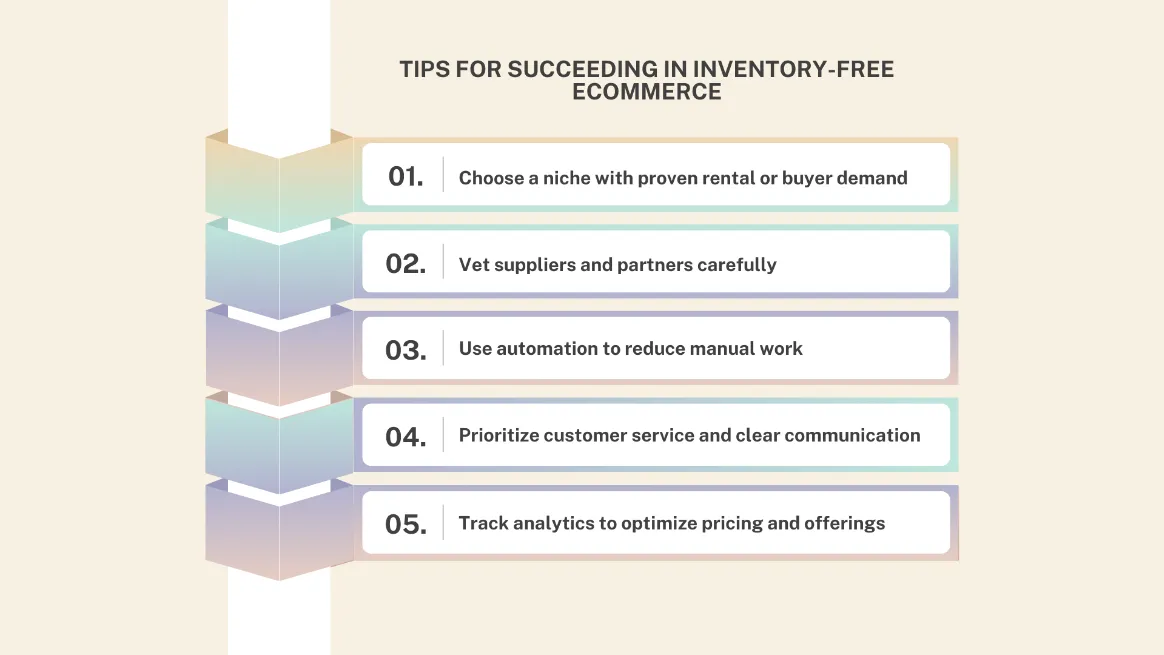
Success without inventory starts with choosing the right niche. Look for steady demand by analyzing search trends, competitor activity, and local behavior to ensure people are already paying for what you want to offer.
Next, focus on strong partners. Reliable suppliers, manufacturers, or rental owners protect your brand by ensuring quality and availability, so take time to vet them carefully.
Automation is key to freeing up your time. Tools like RentMy handle bookings, payments, reminders, and customer communication with minimal effort, reducing errors and saving energy.
At the same time, consider using branding tools like Canva to design logos, social media posts, and marketing materials that make your store stand out.
Great communication builds trust. Quick responses, clear updates, and friendly support keep customers coming back. Finally, track your analytics. Use data on pricing, demand, and traffic to adjust your strategy and grow your store with confidence.
Conclusion
That’s a wrap! We’ve covered how to start an online store without inventory, why the rental model is so effective, and how tools like RentMy make it easy. Now you’ve got a clear plan to start strong and avoid mistakes.
This business isn’t about luck; it’s about smart decisions, simple systems, and a model that keeps your costs low. Starting lean lets you focus on your ideas, building your brand, and serving customers who prefer access over ownership.
What’s next? Pick your niche, test your offer, and let automation take care of the boring stuff. Start today, and you’re already ahead of the crowd, still dreaming about it. Let’s turn your store idea into reality!
FAQs
It’s simple! Choose a model like rentals or dropshipping, use a rental platform, list partner products, set up payments, and start marketing locally. No inventory needed, just smart partnerships and automation to get started quickly.
Yes, it’s completely possible. Automation platforms like RentMy can handle bookings, payments, and reminders for you. This means you only need to spend a few hours each week on tasks like management and local pickups, making it an ideal side business that can expand as demand increases.
Consider rentals like camera gear and event supplies, or services like dropshipping and print-on-demand. Digital products such as books are also great options. These models rely on partners for fulfillment, which keeps your business simple and easy to scale.